A Triangle
The big one, it's time to draw a Triangle. This is a text heavy one, we need to get into a bit of the high level details on how GPUs work, as well as some geometry. Lets start by adding to the previous example
The Triangle Context
Thankfully, drawing a triangle is relatively simple, so we can try to take things one step at a time. And the first is to encapsulate everything needed to draw one:
typedef struct TriangleContext {
  SDL_GPUGraphicsPipeline* mPipeline;
} TriangleContext;
We actually only need a pipeline to draw a triangle, but as we proceed, we'll need much more than that, so we're going to structure this as if we were doing something more complex.
Unfortunately, before we discuss creating one, we should go over what a pipeline is and how it fits into the rendering puzzle. While we're at it, we'll cover shaders.
Shaders and Pipelines
When we look at how we do real-time rendering today, it's essentially a combination of tweakable fixed stages and programmable stages. We got a taste of this fixed functionality when we set-up and executed a RenderPass in the previous chapter. We were able to clear the screen just by tweaking the initialization and target of the RenderPass, with no need to submit geometry to proceed through the rest of the stages.
Pipelines are how we configure everything else not encapsulated in a RenderPass. You have to explain the layout of your data and how they flow from stage to stage, along with what you want the GPU to react to and modify between and after the stages. A rough outline of the stages you'd historically see is the following:
We should first mention the Input Assembler which is something that's technically always happening, but we won't interact with much for a few lessons. Essentially it takes data we describe in the Pipeline, and sets it up to be used in the subsequent stages.
That said, SDL GPU doesn't give us access to every programmable stage you see above, many aren't relevant or performant today and some are too new to have been added for compatibility reasons. What it does give us access to are the classics, Vertex Shaders and Fragment Shaders. It also has Compute Shaders to boot, but they're not part of the Render Pipeline, though we'll find they're still very useful for rendering later on. With regards to our concerns here, we'll write Vertex Shaders to output individual vertices, and Fragment Shaders to output colors.
Note: If you've heard of Mesh Shaders, they effectively replace all of the geometry related stages. What we do in Vertex shaders would likely be sort of the base functionality of learning Mesh Shaders. That said, they're designed to be smarter around data management, letting you implement techniques that we'll have to split between Compute and Vertex shaders when we get there.
So if you're unfamiliar, when I say "programmable" I mean it literally. Shaders are programs that execute on your GPU. Each shader stage tends to have slightly different requirements, you can think about it like function signatures, although it's not a perfect analogy. In general they all have things they need to output, but they can optionally output additional information to be used in the next stage. In some cases that information may be interpolated, such as coordinates along the surface of a triangle. We'll get into the details later!
Each Graphics API takes a different "native" shader input, Vulkan takes SPIR-V, DirectX takes DXIL, and Metal takes MSL. I should mention that when you get into extensions or development only situations there's slightly more flexibility than that, but for our purposes this is good enough to think about. Each of these are an intermediate representation of your program, lying somewhere between the text you wrote in the language you chose, and machine code that can run on your GPU. When implementing the respective Graphics API you'll need to pass it the intermediate it expects. This is also true of SDL_GPU, in which you need declare which ones you can pass, and it can fail if there isn't a backend which can accept it.
There's many languages specifically for shaders, and even general purpose programming languages that can be compiled to, but as stated in the intro, we'll be using HLSL as we have SDL_shadercross to use with well documented binding and set descriptions.
Vertices, Briefly
For this chapter, to not completely overload on information, we're only thinking about triangles, which are each made up of three Vertices, for now simply positions on a 2D plane, that will look like this in code:
typedef struct float2 {
    float x, y;
} float2;
In practice, we're actually going to want several more of these position/vector types:
typedef struct float3 {
    float x, y, z;
} float3;

typedef struct float4 {
    float x, y, z, w;
} float4;
These are each useful for various tasks, such as representing the previous dimensional vector in homogenous coordinates, we'll get into them more as we discuss some of the math we use later on.
Although for right now we won't need the above definitions in our C code, you can add it if you like, but the sample won't have them yet.
We'll just be using static geometry within the shader, with no buffers. We'll get into these details later, but for now, just know that if the individual vertices are within the box below, the triangle will proceed to be shaded.
(-1, 1)                       (1, 1)
    +---------------------------+
    |                           |
    |                           |
    |                           |
    |                           |
    |                           |
    |                           |
    |                           |
    +---------------------------+
(-1, -1)                     (1, -1)
We'll go into much greater detail on the Vertex pipeline, Vertex shaders, and techniques that can be used with them in a chapter or two. Right now though, these are the minimum details you'll need to get going.
The Vertex Shader
Now that we've discussed the theory, let's get back to the code a bit, but before we can make a pipeline, we'll need to write both a Vertex and Fragment shader. We'll create a couple of files [Triangle.vert.hlsl and Triangle.frag.hlsl] to start working on, starting with the Vertex shader.
To display a triangle, we must produce geometry. For very simple shapes like Triangle, and even cubes, we can get away with storing this data within the shader itself. And it's helpful to learn this how to do this because this isn't unlike how you might pull geometry out of a storage buffer. Or for 2D you may store the transformations and UV info for sprites into a storage buffer but produce geometry like we will here.
Our first set of geometry will be a triangle that looks roughly like this:
(-1, 1)                       (1, 1)
    +--------------0--------------+
    |             / \ (0, 1)      |
    |           /     \           |
    |         /         \         |
    |       /             \       |
    |     /                 \     |
    |   /                     \   |
    | /                         \ |
    2-----------------------------1
(-1, -1)                     (1, -1)
With each number at the points representing a vertex in an array. We're specifically laying out the geometry clockwise, which won't come up in this particular example, but will be relevant later in the cube example.
static const float2 cVertexPositions[3] = {
    { 0.0f,  1.0f},
    { 1.0f, -1.0f},
    {-1.0f, -1.0f},
};
We're going to give each coordinate a color as well, so it'll stand out a little more. We'll be able to pass this data from the vertex shader to the pixel shader, we'll go into more detail in a moment.
static const float3 cColors[3] = {
    { 1.0f, 0.0f, 0.0f },
    { 0.0f, 1.0f, 0.0f },
    { 0.0f, 0.0f, 1.0f },
};
Now we've discussed that Vertex Shaders have to output geometry, we do this through returning a value from our main function which we'll be writing in a moment. That said, we do not need to return just a single value. Vertex Shaders can also output data for Fragment Shaders to use. In general these values will be interpolated based on the values of the vertices output by this function based on the position of the pixel within the triangle those vertices make up. We'll discuss this in a bit more detail during the FullScreen Triangle example in the next chapter.
So, to return multiple values, you create a struct that contains those values. The shader needs to know which field means what and the method by which we do this are called "Semantics" in HLSL.
struct Output
{
  float4 Position : SV_Position;
  float3 Color : TEXCOORD0;
};
Here we're telling our shader compiler that we're outputting the vertex position through the required built-in SV_Position semantic. Similarly we're going to want to output the color we've assigned to this vertex and send it along to the Fragment shader. We do this via TEXCOORD0. Now it should be noted that all non-built-in input/output variables will use this semantic with an incrementing n in TEXCOORDn, so TEXCOORD0, TEXCOORD1 and so on. The ns being unique to the input or output struct they're in. This is essentially just a quirk of the shader compiler we're using as it makes it easier for them to transpile our shaders to the other shader languages, but it should be noted that even natively in DX12, the other semantic names are equally unneeded, they're more for the programmer.
Now let's take a look at our main function, it's fairly simple.
Output main(uint id : SV_VertexID)
{
  uint vertexIndex = id % 3;

  Output output;
  output.Position = float4(cVertexPositions[vertexIndex], 0.0f, 1.0f);
  output.Color = cColors[vertexIndex];
  return output;
}
Right off the bat we see two interesting things, the return value is using our Output struct, and we're taking a parameter and it's marked with a built-in semantic. When we mark inputs with semantics, this means that we're asking the shader runtime to let us use that built-in variable. In this case SV_VertexID represents the ID/index of the vertex we're currently processing in this shader. Remember that the Vertex Shader will run for every vertex you request to draw, so in this case it's purely an ID and not an index, as we're not traversing any buffers.
Next we compute the index into our constant buffers for position and color by using modulo to ensure we're always looking within our 3 vertex/colors. The values at that index will be used to fill in our Output instance. Notice that we're passing this vertex position into a float4 along with two other values. Because the existing position is a float2, this means we're extending it to be a float4, with the latter values filing in for z and w.
Now you might wonder why we're using modulo here, since we know we're only going to try rendering 3 vertices. Honestly, you'd be right to think it's unneeded. We're not going to need this for this chapter. But we'll be extending this shader in future chapters, and it's a good habit to get into, as you'll probably not always be rendering only one thing if you're using Vertex Pulling like this.
Fragments (and Pixels)
Thankfully the Fragment shader isn't really as complicated, but there's still some interesting things to discuss.
As mentioned, Fragment shaders are often called Pixel Shaders, and that's likely the easiest way to conceptualize how they work, even though reality may differ a bit. When rendering a Triangle output from the Geometry phase, we eventually need to start processing each pixel and determine what's being output to the relevant targets we setup in our RenderPass. As a reminder, we're just rendering to the Swapchain for now, which is effectively the Window.
As we process each pixel we'll be running our Fragment shader over each pixel the triangle intersects with. So the primary purpose of this shader, for now, is just to output a color to be placed in the pixel we're processing. Typically though, triangles are not a single color, so the shader needs to know "where" they are within the triangle to do the work to figure out what to output. In later chapters we'll learn about Texture Coordinates or "UVs" that go deeper into the "where" aspect, but for now all we really need to understand is that arguments passed from the Vertex Shader to the Fragment Shader are interpolated, based on where the pixel is in relation to the three Vertices that each output their own value for that argument.
The classic example of this is color, we glossed over this a bit above, but each Vertex was indeed passing a different color to the fragment shader. So this means that over the surface of the triangle, we'll be seeing the pixels interpolate between those three colors. In terms of the shader, as mentioned, it's incredibly simple:
float4 main(float3 color : TEXCOORD0) : SV_Target0
{
    return float4(color, 1.0f);
}
Once again like the Vertex Shader, we're taking an argument, this time TEXCOORD0, which as discussed above, is the color we passed from the Vertex Shaders. Based on the position of the pixel in relation to our vertices, it'll be be more or less Red/Green/Blue. And what we return is the color, including an Alpha (transparency) value, for now we're just setting that to 1.0f, which is fully opaque. We'll note that the return value is a float4, but we know that we've got to set an intrinsic so the shader compiler knows what we're actually returning and where to place it. Well when you're not returning a struct like above, you put the intrinsic after the function signature, and before the block, so the intrinsic binding to our float4 return value is SV_Target0, which is to say this value is being written to the 0th Color target, which again, we remember setting up in our RenderPass in the previous chapter.
Now before finishing up with the C side of all of this, let's briefly go over how you'll need to compile your shaders, should you not be using the template.
Compiling your Shaders
The samples all build their shader code as part of their CMake build, and you're encouraged to copy the sample from Chapter 1 and reuse it for all of them to sidestep the details here, but let's cover this briefly.
As discussed previously, we use SDL_shadercross for compiling our shaders. We'll cover compiling all three types of shaders here, but you'll only be compiling your vertex and pixel shaders in this chapter.
The anatomy of a call into SDL_shadercross is as such:
SDL_shadercross <InputShader> -g --source <SourceFormat> --dest <DestinationFormat> --stage <ShaderStage> --output <OutputShader>
The SourceFormat will always be HLSL for also, but you can also pass SPIRV into it. Obviously it must match the format of the InputShader. Similarly DestinationFormat is the format we're compiling for, and it's what the OutputShader will come out as. And you must also let the tool know which ShaderStage you're compiling this shader for. Finally one addition here that hasn't been mentioned is the -g flag. This ensures the compiler emits debug info into the compiled shader. This isn't something you'd want to use in a released game or for a release build, but it's useful for debugging and trying to figure out why you're seeing what you're seeing.
When we automate this, we generally generate shaders for all backends of SDL_GPU, but if you'd like to simplify things for yourself, you can choose to only do the ones available to you, or choose one among those and only compile that one. Just ensure you adjust your call to SDL_CreateGPUDevice to only take the ones you're compiling.
Lets see what compiling the vertex shader for all of our backends looks like.
SDL_shadercross Triangle.vert.hlsl -g --source HLSL --dest SPIRV --stage vertex --output Triangle.vert.spv
SDL_shadercross Triangle.vert.hlsl -g --source HLSL --dest MSL --stage vertex --output Triangle.vert.msl
SDL_shadercross Triangle.vert.hlsl -g --source HLSL --dest DXIL --stage vertex --output Triangle.vert.dxil
And the Fragment shader
SDL_shadercross Triangle.frag.hlsl -g --source HLSL --dest SPIRV --stage fragment --output Triangle.frag.spv
SDL_shadercross Triangle.frag.hlsl -g --source HLSL --dest MSL --stage fragment --output Triangle.frag.msl
SDL_shadercross Triangle.frag.hlsl -g --source HLSL --dest DXIL --stage fragment --output Triangle.frag.dxil
And a theoretical, but nonexistent, compute shader
SDL_shadercross Triangle.comp.hlsl -g --source HLSL --dest SPIRV --stage compute --output Triangle.comp.spv
SDL_shadercross Triangle.comp.hlsl -g --source HLSL --dest MSL --stage compute --output Triangle.comp.msl
SDL_shadercross Triangle.comp.hlsl -g --source HLSL --dest DXIL --stage compute --output Triangle.comp.dxil
Assuming your shaders were correct, you should now have those output files and be able to load them as we're setting up our pipeline.
Back to Creating the Context
And now, we return to the CPU side, and execute on what we know we need based on what we did in our shaders.
Loading Shaders
We'll begin by writing a function to create an SDL_GPUShader, as we'll need it almost immediately for creating our Pipeline.
SDL_GPUShader* CreateShader(
  const char* aShaderFilename,
  SDL_GPUShaderStage aShaderStage,
  Uint32 aSamplerCount,
  Uint32 aUniformBufferCount,
  Uint32 aStorageBufferCount,
  Uint32 aStorageTextureCount,
  SDL_PropertiesID aProperties)
We want this to be relatively generic, so we'll take the name of the file we're loading, which will be something like ShaderName.<shader stage>. In theory, we could parse that final bit and determine the shader stage, but it's a waste of time, we know what it is, so we'll just pass it in along with the name. Next we need to declare our inputs to this shader. The finer details of these will be in the docs for SDL_CreateGPUShader, but we'll go over them as time moves on and we use each of these. Suffice it to say, the next four arguments are used to make those declarations. Thankfully just telling SDL the counts will suffice. Finally we'll take a properties object, because while we'll ensure we always set a name by using the global properties object we made, we may find that we want to, in the future, make it possible to set customized properties. There's other ways to do this as well, but this feels like a reasonable interface for what we need. You'll see something fairly similar if you start reading the SDL_gpu_examples repo.
Thankfully actually creating a shader is relatively easy, so lets go over all the steps, starting with loading one of the files we compiled above.
char shader_path[4096];
SDL_snprintf(shader_path, SDL_arraysize(shader_path), "Assets/Shaders/%s/%s.%s", TARGET_NAME, aShaderFilename, gContext.mChosenBackendFormatExtension);

size_t fileSize = 0;
void* fileData = SDL_LoadFile(shader_path, &fileSize);
SDL_assert(fileData);

SDL_PropertiesID properties = gContext.mProperties;

if (aProperties != 0) {
properties = aProperties;
}

SDL_assert(SDL_SetStringProperty(properties, SDL_PROP_GPU_SHADER_CREATE_NAME_STRING, aShaderFilename));
We create a local buffer that should be big enough to cover just about any name you give for your project or Shader name. Where specifically you place this file doesn't matter much, as long as you make sure your executable can reach it. Here I'm placing these files into a Shader directory within an Assets, that contains the files I compiled above. I also use a define I made in the CMakeLists.txt for this and all my chapter examples, that is a string containing the name of this example. This isn't required, but I found it helpful as the Shaders generally will be named the same for many or most chapter examples, and this way they don't have conflicts between them if they're placed in the same directory.
We also take advantage of us determining the backend format extension at device creation to know which file to load, if we've compiled them all. Once we've constructed our path, we can simply call SDL_LoadFile to get the full data of our compiled shader. Lastly we'll check to see if the user passed in a valid set of Properties for us to pass along when creating the shader, if not we'll use the global one we created, and then set the property on it that sets a name for the shader we're creating. This is useful for debugging, particularly later one when you may have a bunch of shaders and pipelines, so I always build my abstractions to ensure I'm setting them.
Next we can cover the actual creation call:
SDL_GPUShaderCreateInfo shaderCreateInfo;
SDL_zero(shaderCreateInfo);

shaderCreateInfo.entrypoint = gContext.mShaderEntryPoint;
shaderCreateInfo.format = gContext.mChosenBackendFormat;
shaderCreateInfo.code = (Uint8*)fileData;
shaderCreateInfo.code_size = fileSize;
shaderCreateInfo.stage = aShaderStage;
shaderCreateInfo.num_samplers = aSamplerCount;
shaderCreateInfo.num_uniform_buffers = aUniformBufferCount;
shaderCreateInfo.num_storage_buffers = aStorageBufferCount;
shaderCreateInfo.num_storage_textures = aStorageTextureCount;
shaderCreateInfo.props = properties;

SDL_GPUShader* shader = SDL_CreateGPUShader(gContext.mDevice, &shaderCreateInfo);

SDL_free(fileData);
SDL_assert(shader);

return shader;
As always we declare our creation struct and 0 it out. In order we have:
- The entry point of the shader, which we determined based on which backend format was selected for us to use. These were set up to match what the shader compilers generate for each shader format.
- The backend format that ended up being selected for us.
- 2 fields that have a pointer to and size of the compiled shader data
- 4 fields which, as mentioned above, is simply us declaring the number of inputs of each type this shader takes
- The properties object we just set up to ensure it contains the name of the shader for debugging purposes.
With all of that out of the way, we can finally create the shader, free the file we loaded, and assert that everything went as planned.
Actually Creating the Pipeline
Finally, lets start creating our context, which for now is really just the pipeline.
TriangleContext CreateTriangleContext() {
  SDL_GPUColorTargetDescription colorTargetDescription;
  SDL_zero(colorTargetDescription);
  colorTargetDescription.format = SDL_GetGPUSwapchainTextureFormat(gContext.mDevice, gContext.mWindow);
Like when creating the RenderPass and returning from the Fragment shader, we'll need to consider the color target. We'll need an SDL_GPUColorTargetDescription, which we'll zero out. Because we're just rendering to the swapchain, we'll need to query it to know what format it is and set the corresponding field as such. There's a field here for configuring "blending", but it's not relevant yet, we'll cover it in a few chapters!
With that out of the way, we can begin configuring our Pipeline.
SDL_assert(SDL_SetStringProperty(gContext.mProperties, SDL_PROP_GPU_GRAPHICSPIPELINE_CREATE_NAME_STRING, "TriangleContext"));

SDL_GPUGraphicsPipelineCreateInfo graphicsPipelineCreateInfo;
SDL_zero(graphicsPipelineCreateInfo);
graphicsPipelineCreateInfo.target_info.num_color_targets = 1;
graphicsPipelineCreateInfo.target_info.color_target_descriptions = &colorTargetDescription;
graphicsPipelineCreateInfo.primitive_type = SDL_GPU_PRIMITIVETYPE_TRIANGLELIST;
graphicsPipelineCreateInfo.props = gContext.mProperties;
Once again, we'll set the name for this pipeline and ensure the properties is passed along so we have this name when debugging later on. We'll also assign out the color target description we just configured, and let the pipeline know there's only one color target to deal with. We also need to let the pipeline know that it's going to be rendering lists of triangles, rather than points, lines, triangle strips, and so on.
We'll need to load up and create our shaders, so we'll pass in the names of the shaders we wrote earlier, and call the function we wrote just above.
graphicsPipelineCreateInfo.vertex_shader = CreateShader(
  "Triangle.vert",
  SDL_GPU_SHADERSTAGE_VERTEX,
  0,
  0,
  0,
  0,
  0
);
SDL_assert(graphicsPipelineCreateInfo.vertex_shader);

graphicsPipelineCreateInfo.fragment_shader = CreateShader(
  "Triangle.frag",
  SDL_GPU_SHADERSTAGE_FRAGMENT,
  0,
  0,
  0,
  0,
  0
);
SDL_assert(graphicsPipelineCreateInfo.fragment_shader);
It's fairly easy to fill these out, we're just passing along the relevant name and stage, and the rest is all 0s. We'll start looking at buffers starting in the next chapter, but we know from writing the shaders earlier that these don't take anything from the CPU. After this we're essentially finished.
  TriangleContext context;
  context.mPipeline = SDL_CreateGPUGraphicsPipeline(gContext.mDevice, &graphicsPipelineCreateInfo);
  SDL_assert(context.mPipeline);

  SDL_ReleaseGPUShader(gContext.mDevice, graphicsPipelineCreateInfo.vertex_shader);
  SDL_ReleaseGPUShader(gContext.mDevice, graphicsPipelineCreateInfo.fragment_shader);

  return context;
}
We'll create our context, fill out our mPipeline field by making the create call with the struct we've been filling out, assert it was created successfully, and release the GPU shaders, as we won't need them again.
Drawing and Cleanup of the Context
We've gotta button up this context, thankfully making a draw and cleaning up are both very easy for this first Pipeline. Future chapters will have our draw function become much more complex.
void DrawTriangleContext(TriangleContext* aPipeline, SDL_GPURenderPass* aRenderPass)
{
  SDL_BindGPUGraphicsPipeline(aRenderPass, aPipeline->mPipeline);
  SDL_DrawGPUPrimitives(aRenderPass, 3, 1, 0, 0);
}
We'll need the RenderPass main is configuring, but fundamentally what we're doing here is incredibly simple. We need to bind the pipeline we just created, so that SDL_GPU will know that future draws to this RenderPass will use it. Next we can just make a single call to SDL_DrawGPUPrimitives. We really only care about the first 3 parameters here. Like the bind, we need to pass the RenderPass, as it's what we're using to make the draw. The important bit is that we're drawing only 3 vertices, we're hardcoded in the vertex shader that it only expects to be called 3 times, to complement this, we're also telling it we're only rendering one instance of this thing.
This is what gets down to the crux of what we're doing in that shader by hardcoding those positions and colors. Telling the Draw to "draw" 3 vertices doesn't mean we're passing data in from the CPU and to use those, although it might. It really just means it's going to invoke the vertex shader num_vertices * num_instances number of times. If we've bound buffers, then there is more work to be done, and discussions to be had, but we can put off how that works for some time.
Finally we can simply release the pipeline we created, and zero out the context struct while we're at it:
void DestroyTriangleContext(TriangleContext* aPipeline)
{
  SDL_ReleaseGPUGraphicsPipeline(gContext.mDevice, aPipeline->mPipeline);
  SDL_zero(*aPipeline);
}
Bringing it together
Now that we've abstracted everything using this context will be very easy:
TriangleContext triangleContext = CreateTriangleContext();
After creating the device we can simply make a call to create our context struct.
SDL_GPURenderPass* renderPass = SDL_BeginGPURenderPass(
  commandBuffer,
  &colorTargetInfo,
  1,
  NULL
);

DrawTriangleContext(&triangleContext, renderPass);

SDL_EndGPURenderPass(renderPass);
In between the Being/End of the RenderPass, we can just stick in our call to the Draw of the context.
DestroyTriangleContext(&triangleContext);
And finally, we can clean up!
If you run the program, you should see a nice, friendly triangle.
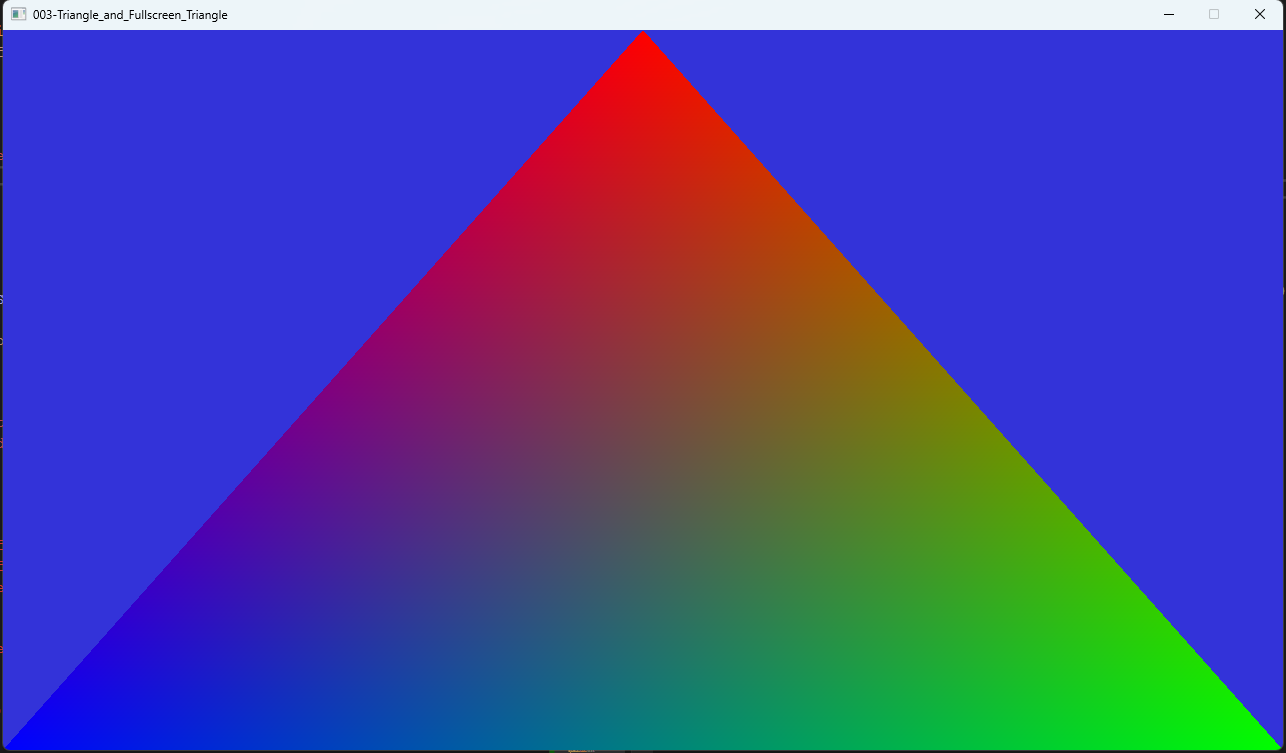
As mentioned, the colors are interpolated across the surface of the triangle. As you get closer to one vertex, the value it outputs to the fragment shader is favored more and the others less. We'll go over this in more detail in a future lesson.
Next up, lets talk about some math, and a practical application for a single triangle, as well as a discussion of how to pass some small data into the GPU for use by the shaders.
#include <SDL3/SDL.h>
#include <SDL3/SDL_stdinc.h>

// This is for testing to ensure the code works in both C and C++,
// this entire preprocessor block should just be the #include
// in your own code.
#ifndef __cplusplus
#include <SDL3/SDL_main.h>
#else
namespace cpp_test {
#endif

/////////////////////////////////////////////////////////////////////////////////////////////////////////////////
// Shared GPU Code
/////////////////////////////////////////////////////////////////////////////////////////////////////////////////
typedef struct GpuContext {
  SDL_Window* mWindow;
  SDL_GPUDevice* mDevice;
  SDL_PropertiesID mProperties;
  const char* mShaderEntryPoint;
  SDL_GPUShaderFormat mChosenBackendFormat;
  const char* mChosenBackendFormatExtension;
} GpuContext;

GpuContext gContext;

void CreateGpuContext(SDL_Window* aWindow) {
  SDL_zero(gContext);

  gContext.mWindow = aWindow;
  gContext.mDevice = SDL_CreateGPUDevice(SDL_GPU_SHADERFORMAT_SPIRV | SDL_GPU_SHADERFORMAT_DXIL | SDL_GPU_SHADERFORMAT_MSL, true, NULL);
  SDL_assert(gContext.mDevice);

  SDL_assert(SDL_ClaimWindowForGPUDevice(gContext.mDevice, gContext.mWindow));

  gContext.mProperties = SDL_CreateProperties();
  SDL_assert(gContext.mProperties);

  SDL_GPUShaderFormat availableFormats = SDL_GetGPUShaderFormats(gContext.mDevice);
  gContext.mShaderEntryPoint = NULL;

  if (availableFormats & SDL_GPU_SHADERFORMAT_SPIRV)
  {
    gContext.mChosenBackendFormat = SDL_GPU_SHADERFORMAT_SPIRV;
    gContext.mShaderEntryPoint = "main";
    gContext.mChosenBackendFormatExtension = "spv";
  }
  else if (availableFormats & SDL_GPU_SHADERFORMAT_MSL)
  {
    gContext.mChosenBackendFormat = SDL_GPU_SHADERFORMAT_MSL;
    gContext.mShaderEntryPoint = "main0";
    gContext.mChosenBackendFormatExtension = "msl";
  }
  else if (availableFormats & SDL_GPU_SHADERFORMAT_DXIL)
  {
    gContext.mChosenBackendFormat = SDL_GPU_SHADERFORMAT_DXIL;
    gContext.mShaderEntryPoint = "main";
    gContext.mChosenBackendFormatExtension = "dxil";
  }
}

void DestroyGpuContext() {
  SDL_DestroyProperties(gContext.mProperties);
  SDL_DestroyGPUDevice(gContext.mDevice);
  SDL_DestroyWindow(gContext.mWindow);
  SDL_zero(gContext);
}

SDL_GPUShader* CreateShader(
  const char* aShaderFilename,
  SDL_GPUShaderStage aShaderStage,
  Uint32 aSamplerCount,
  Uint32 aUniformBufferCount,
  Uint32 aStorageBufferCount,
  Uint32 aStorageTextureCount,
  SDL_PropertiesID aProperties)
{
  char shader_path[4096];
  SDL_snprintf(shader_path, SDL_arraysize(shader_path), "Assets/Shaders/%s/%s.%s", TARGET_NAME, aShaderFilename, gContext.mChosenBackendFormatExtension);

  size_t fileSize = 0;
  void* fileData = SDL_LoadFile(shader_path, &fileSize);
  SDL_assert(fileData);

  SDL_PropertiesID properties = gContext.mProperties;

  if (aProperties != 0) {
    properties = aProperties;
  }

  SDL_assert(SDL_SetStringProperty(properties, SDL_PROP_GPU_SHADER_CREATE_NAME_STRING, aShaderFilename));

  SDL_GPUShaderCreateInfo shaderCreateInfo;
  SDL_zero(shaderCreateInfo);

  shaderCreateInfo.entrypoint = gContext.mShaderEntryPoint;
  shaderCreateInfo.format = gContext.mChosenBackendFormat;
  shaderCreateInfo.code = (Uint8*)fileData;
  shaderCreateInfo.code_size = fileSize;
  shaderCreateInfo.stage = aShaderStage;
  shaderCreateInfo.num_samplers = aSamplerCount;
  shaderCreateInfo.num_uniform_buffers = aUniformBufferCount;
  shaderCreateInfo.num_storage_buffers = aStorageBufferCount;
  shaderCreateInfo.num_storage_textures = aStorageTextureCount;
  shaderCreateInfo.props = properties;

  SDL_GPUShader* shader = SDL_CreateGPUShader(gContext.mDevice, &shaderCreateInfo);

  SDL_free(fileData);
  SDL_assert(shader);

  return shader;
}

/////////////////////////////////////////////////////////////////////////////////////////////////////////////////
// Technique Code
/////////////////////////////////////////////////////////////////////////////////////////////////////////////////
typedef struct TechniqueContext {
  SDL_GPUGraphicsPipeline* mPipeline;
} TechniqueContext;

TechniqueContext CreateTechniqueContext() {
  SDL_GPUColorTargetDescription colorTargetDescription;
  SDL_zero(colorTargetDescription);
  colorTargetDescription.format = SDL_GetGPUSwapchainTextureFormat(gContext.mDevice, gContext.mWindow);

  SDL_GPUGraphicsPipelineCreateInfo graphicsPipelineCreateInfo;
  SDL_zero(graphicsPipelineCreateInfo);

  graphicsPipelineCreateInfo.target_info.num_color_targets = 1;
  graphicsPipelineCreateInfo.target_info.color_target_descriptions = &colorTargetDescription;
  graphicsPipelineCreateInfo.primitive_type = SDL_GPU_PRIMITIVETYPE_TRIANGLELIST;

  graphicsPipelineCreateInfo.vertex_shader = CreateShader(
    "Triangle.vert",
    SDL_GPU_SHADERSTAGE_VERTEX,
    0,
    0,
    0,
    0,
    SDL_PROPERTY_TYPE_INVALID
  );
  SDL_assert(graphicsPipelineCreateInfo.vertex_shader);

  graphicsPipelineCreateInfo.fragment_shader = CreateShader(
    "Triangle.frag",
    SDL_GPU_SHADERSTAGE_FRAGMENT,
    0,
    0,
    0,
    0,
    SDL_PROPERTY_TYPE_INVALID
  );
  SDL_assert(graphicsPipelineCreateInfo.fragment_shader);

  SDL_assert(SDL_SetStringProperty(gContext.mProperties, SDL_PROP_GPU_GRAPHICSPIPELINE_CREATE_NAME_STRING, "TechniqueContext"));

  TechniqueContext pipeline;
  SDL_zero(pipeline);
  pipeline.mPipeline = SDL_CreateGPUGraphicsPipeline(gContext.mDevice, &graphicsPipelineCreateInfo);
  SDL_assert(pipeline.mPipeline);

  SDL_ReleaseGPUShader(gContext.mDevice, graphicsPipelineCreateInfo.vertex_shader);
  SDL_ReleaseGPUShader(gContext.mDevice, graphicsPipelineCreateInfo.fragment_shader);

  return pipeline;
}

void DrawTechniqueContext(TechniqueContext* aPipeline, SDL_GPURenderPass* aRenderPass)
{
  SDL_BindGPUGraphicsPipeline(aRenderPass, aPipeline->mPipeline);
  SDL_DrawGPUPrimitives(aRenderPass, 3, 1, 0, 0);
}

void DestroyTechniqueContext(TechniqueContext* aPipeline)
{
  SDL_ReleaseGPUGraphicsPipeline(gContext.mDevice, aPipeline->mPipeline);
  SDL_zero(*aPipeline);
}

/////////////////////////////////////////////////////////////////////////////////////////////////////////////////
// Main
/////////////////////////////////////////////////////////////////////////////////////////////////////////////////
int main(int argc, char** argv)
{
  (void)argc;
  (void)argv;
  SDL_assert(SDL_Init(SDL_INIT_VIDEO));

  SDL_Window* window = SDL_CreateWindow(TARGET_NAME, 1280, 720, 0);
  SDL_assert(window);

  CreateGpuContext(window);

  TechniqueContext context = CreateTechniqueContext();

  bool running = true;

  while (running) {
    SDL_Event event;
    while (SDL_PollEvent(&event)) {
      switch (event.common.type) {
        case SDL_EVENT_QUIT:
          running = false;
          break;
      case SDL_EVENT_QUIT:
        running = false;
        break;
      }
    }

    SDL_GPUCommandBuffer* commandBuffer = SDL_AcquireGPUCommandBuffer(gContext.mDevice);
    if (!commandBuffer)
    {
      SDL_Log("AcquireGPUCommandBuffer failed: %s", SDL_GetError());
      continue;
    }

    SDL_GPUTexture* swapchainTexture;
    if (!SDL_WaitAndAcquireGPUSwapchainTexture(commandBuffer, gContext.mWindow, &swapchainTexture, NULL, NULL))
    {
      SDL_Log("WaitAndAcquireGPUSwapchainTexture failed: %s", SDL_GetError());
      continue;
    }

    SDL_GPUColorTargetInfo colorTargetInfo;
    SDL_zero(colorTargetInfo);

    colorTargetInfo.texture = swapchainTexture;
    colorTargetInfo.load_op = SDL_GPU_LOADOP_CLEAR;
    colorTargetInfo.store_op = SDL_GPU_STOREOP_STORE;
    colorTargetInfo.clear_color.r = 0.2f;
    colorTargetInfo.clear_color.g = 0.2f;
    colorTargetInfo.clear_color.b = 0.85f;
    colorTargetInfo.clear_color.a = 1.0f;

    SDL_GPURenderPass* renderPass = SDL_BeginGPURenderPass(
      commandBuffer,
      &colorTargetInfo,
      1,
      NULL
    );

    DrawTechniqueContext(&context, renderPass);

    SDL_EndGPURenderPass(renderPass);
    SDL_SubmitGPUCommandBuffer(commandBuffer);
  }

  DestroyTechniqueContext(&context);

  DestroyGpuContext();

  SDL_Quit();
  return 0;
}

#ifdef __cplusplus
} // end cpp_test
#endif
Download the source for this example here.